Another Day in the Life of a Programmer Gal | To curiosity…

CAT | SQL Server stuff

I got the following email from devx.com, unfortunately when I replied to this colleague, the email bounced. I’m hoping he can Google this up.

Hi Lizet,

I just read your article on www.devx.com about data loss in Merge Replication. Unfortunately we are experiencing this exact same bug. I have already upgraded the subscriber server to SP3. Do you know if the fix for this issue is included in SQL Server Express SP3 and will it get applied if I just upgrade an existing instance from SP2 to SP3? Or do I need to do a complete uninstall and reinstall? Also, is there anything I can do to verify the subscriber instance had the correct patches applied to it? I appreciate your help on this and the article you wrote. We have a lot of work ahead of us restoring data lost but it could have been worse if not for this article.

I appreciate your time.

My replies:

As far as I can remember any SQL Server Engine (whether Express or Standard or Enterprise) had the problem.
The publisher and the distributor (which can only be a Standard or an Express instance) should be patched as well. Any engine with a version lower than 9.00.3228.00 should be patched, whether applying SP3 or only the Cumulative Update they launched after the replication problem came to the public light.
You can check the version at the subscribers using sqlcmd.
If your subscriber engines are installed as the default engine and use windows authentication, you can connect to them using the following command, you need to be an administrator on the machine in order to apply the CU:
sqlcmd -E
checking the version on the sqlcmd command prompt would be:
> select @@version
>GO
I remember patching the subscribers was a pain, as we didn’t want to push the update automatically and we connected to every single subscriber remotely to make sure the patch (CU6 for SP2 in our case) was applied properly.

I added a post to my blog with the line of code that caused the mess. The link is
http://theniceweb.com/2008/02/fix-for-batch-deletions-at-publisher.html
Hope this helps, good luck

and


I forgot to answer two of your questions:
Do you know if the fix for this issue is included in SQL Server Express SP3
Yes, the fix is included in SP3. Make sure you patch the publisher and distributor as well, not only the subscribers.
and will it get applied if I just upgrade an existing instance from SP2 to SP3?
Yes.
Or do I need to do a complete uninstall and reinstall?
No, just patch.

Usually you can recover the published database from a previous backup but as you usually don’t keep synchronized backups of each subscriber, you have to recreate the publication and subscriptions, potentially destroying any data at the subscribers that has not been merged yet. Or you could copy the subscriber database to a different location, recreate publication and subscription and manually add the data that didn’t merge from your saved database to the newly merged database.

Hopefully this reaches you, again good luck recovering the data.

No tags

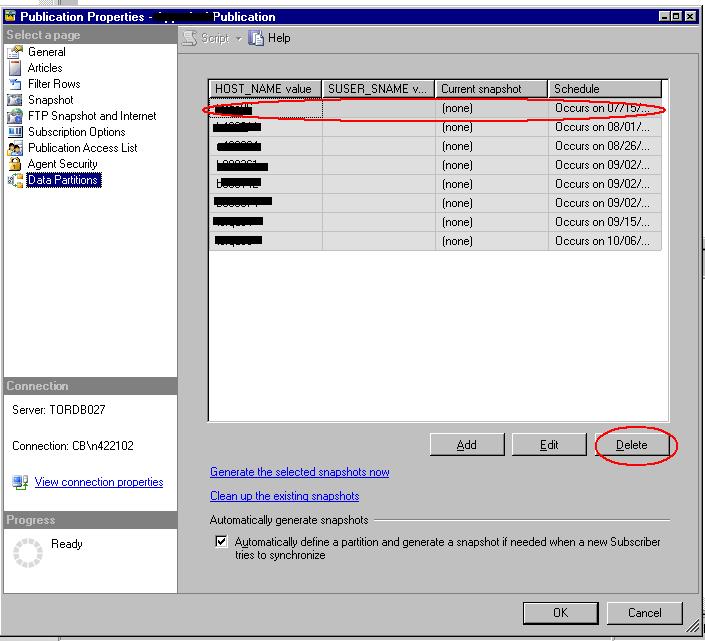
We wanted to delete old data partition on our merge publication. The Management Studio has a nice UI to view the data partitions and generate the dynamic snapshot per partition, also to delete the partitions you no longer need.

Be warned that this nice UI delete button won’t delete the partition folder at the distributor nor will delete the dynamic snapshot job at the distributor. If you try to add a partition with the same filter token, it will fail.

In order to have a fresh start for that partition value you should:

1. Verify that the subscriptions that use that data partition don’t exist anymore.
2. Delete the data partition using the Publication Properties UI
3. Delete the data partition using the sp_dropmergepartition stored procedure:

use [Published_Database]
exec sp_dropmergepartition @publication = N’Publication_Name’, @suser_sname = N”, @host_name = N’the string we use to filter the data part’
GO

4. Delete the replication partition folder manually at \\distributor\repldata

Happy data merging!

PS SQL Server version 9.00.3228

No tags

We have a merge replication topology with pull subscriptions. We have a setting to expire the subscriptions that haven’t synchronized in the past X days. This setting was mainly due to optimizations, when you don’t expire your subscriptions the amount of metadata to be used grows and grows and your merge process suffers.

The drawback on this setting is that it also makes the snapshot obsolete after X days for any new or reinitialized subscription.

When you add a new subscription to your publication and the snapshot was generated X-1 days ago you will have the following error:

The snapshot for this publication has become obsolete. The snapshot agent needs to be run again before the subscription can be synchronized.

At first we wondered why we got this error when the rest of the subscriptions were working just fine and also wondered what impact would have on the existing subscriptions to regenerate the snapshot.

The answer is: no impact.

We got the explanation from one of Hilary Cotter‘s replies:

The snapshot contains all the data, schema and metadata required to create
all the objects on the subscriber. After one day in your case the metadata
on the publisher is purged and what is in the snapshot will not be
sufficient to sync with the publisher, hence you need a new snapshot.

You want to set a small number so that not a lot of data goes across the
wire, but a big enough number so that the majority of your subscribers will
sync within the expiration time. If you set it to an infinite amount – never
expires, a lot of data will have to go to the subscriber to get it back in
sync.

And another reply with further clarifications:

The answer lies in the MSmerge_contents and MSmerge_genhistory tables.
These two tables hold the list of data changes that happened for the
past x days, x being the subscription expiration days. After x days the
record of the data change expire from the MSmerge_contents table. The
implication of that is that existing subscriptions that have not
synchronised for the past x days will then not be able to merge that
change anymore. The same holds true for creating new subscriptions with
an old snapshot – remember the snapshot also contains data. If the
snapshot was created x-2 days ago you will missing two days of data
changes that has already expired from the MSmerge_contents table.

and

a thread on MSDN:
http://forums.microsoft.com/MSDN/ShowPost.aspx?PostID=945801&SiteID=1

No tags

We have a merge topology in place with pull subscriptions, this is the merge agent runs at the subscribers.
One of our subscriptions in had the error that the merge process couldn’t find the server. The server was there and the ping was fine, also the Replication Monitor was able to register the error with the x mark.

The details of the ertor are as follows:

Command attempted:

{call sp_MSensure_single_instance (N’Merge Agent Name’, 4)}

Error messages:

The merge process could not connect to the Publisher ‘Server:database’. Check to ensure that the server is running. (Source: MSSQL_REPL, Error number: MSSQL_REPL-2147199368)
Get help: http://help/MSSQL_REPL-2147199368

Another merge agent for the subscription(s) is running or the server is working on a previous request by the same agent. (Source: MSSQLServer, Error number: 21036)
Get help: http://help/21036

Our error was due to the second cause. It seems the subscriber had lost power while replicating, and any replication after that could not acquire a lock for the merge agent. We restarted the subscriber machine, reinitialized the subscription, with no luck. Only when we dropped the subscription and recreated it again the subscriber was able to run the replication agent again. Just a curious note for the future as this error is not well documented. The only MSDN forum thread that deals with is is still unanswered here…

No tags

Right now I’m swamped making reports in SSRS 2005. Even though that might be considered a junior’s task I found it interesting. Last time I created report templates was 10 years ago with Quick Reports and VB 6 in the late 1990s :-p

My team recommended SSRS over Crystal Reports and VTO mainly because we have had a previous bad experience with word templates for report generation and really liked the idea or having the report engine accessible using a web service. Also being the RDL files xml with a documented schema, instead of the proprietary Crystal Report format, made us believe SSRS might go farther in the long run. Price was also a consideration for ruling out Crystal Reports. One of the big points towards this decision was the Report Manager in SSRS. Deploying our reports independently of the application where they will be viewed allow us to deploy and test the reports in parallel. There is no need to wait until the main application goes to QA. Report subscriptions was another plus.

The purpose of this short post is not to compare those three technologies though. You can see a good comparison of Crystal Reports vs SSRS here.

Our initial hesitation of putting most of our eggs on the SSRS’s basket is almost gone now, but not without having a wish list that would make the maintenance of our solution easier:

- Widows and Orphans control, there’s a hack if you use a rectangle control to group elements, KeepTogether property for a table doesn’t work
- Full aligned text, no workaround for this AFAIK.
- Reuse datasets in the reports that belong to the same project.
- Reuse images
- Reuse custom code and make it visible other than in the Report Properties->Code Tab
- Be able to re-use headers and footers on all the reports on the project.
- Be able to use more than one reportitem in an expression for an element in the header or footer.
You have to do lots of hacks in order to achieve this.I have an example of doing this using a dataset and an internal report parameter after I gave up on using the ReportItems for hiding or showing header elements.
-Barcode print in PDF, some barcode fonts get distorted when the report is rendered as a PDF,
so you have to rely on third party components such as Aspose.Barcode. Microsoft SSRS team fixed some fonts on the SP2 for SQL Server 2005 but unfortunately the font we use is not fixed yet.
-More alignment with the Visual Studio project layout. Being able to group reports in subfolders, being able to see the shared datasets in a project folder, the custom code in a project folder, being able to see the referenced external assemblies similar to the references added to the visual studio web and windows projects.
I know that aligning the web rendering with the PDF rendering might be too much to ask, but it would be really nice if the report rendered in HTML form would look similar to its PDF counterpart. Right now you cannot rely on the HTML view at all
when your final renderer is PDF.
- Rendering RTF text out of the database (I still have to explore this on 2008)
- Using CSS to apply styles to your textboxes.

Hope this helps if you have to make a technology decision, I’m sure I’ll increase the wish list soon…

No tags


I published a post with the wrong title. It was Compressed snapshot check makes it fail on one subscriber

However the file dynsnapvalidation.tok appears inside the partitioned snapshot whether you select snapshot compression or not. This .tok file shows up if you create data partitions per parameterized filter.

No tags

Tips and tricks:

  • You can install any hotfix in silent mode passing the parameter /quiet to the executable in the command prompt or in a batch file. This is extremely helpful if you want to push the hotfix installation with a third party tool and without the wizard interface
  • The /? parameter will give you the rest of the options for installing the hotfix. A very useful option is /allinstances
  • You might wonder why would you like to run any hotfix unsupervised, it might not make sense on a stand alone server but it makes sense when you have a few dozen of remote subscribers and/or you deploy SQLE as part of a SmartClient application. Your batch script can provide you with the installation log afterwards.
  • You cannot rollback a hotfix or a SQL Server Service Pack. The only option is to reinstall the SQL Server instance. Plan your testing very carefully…
  • If you have a virtual drive on the box where you’re applying the hotfix beware that it will try to unzip its files in it. If that virtual drive is read only or used for another purposes you might have troubles. To determine if there is a virtual drive on your box run the command subst. You can always delete the virtual drive apply the hotfix (it will unzip on c: or the drive where the windows installation is, as expected) and put back the virtual drive after the hotfix is applied.

Hope this helps and happy patching!

No tags

Yay!

The fix is in there. Please see previous post for the original bug description. We had problems when not using partition groups on our merge replication topology, whenever there were batch deletions caused by filtering those rows were deleted at the publisher during the next replication.

The faulty stored procedure was sp_MSdelsubrowsbatch

The faulty line of code, believe it or not, a single line
on the faulty sproc:

— change tombstone type for the non-original rows (the rows that got deleted via expansion).
update dbo.MSmerge_tombstone
set type = 1
from
(select distinct tablenick, rowguid from
#notbelong where original_row <> 1) nb,
dbo.MSmerge_tombstone ts
where ts.tablenick = nb.tablenick and
ts.rowguid = nb.rowguid
option (FORCE ORDER, LOOP JOIN)

On the sproc after CU6:
update dbo.MSmerge_tombstone
set type = @METADATA_TYPE_PartialDelete
from
(select distinct tablenick, rowguid from
#notbelong where original_row <> 1) nb,
dbo.MSmerge_tombstone ts
where ts.tablenick = nb.tablenick and
ts.rowguid = nb.rowguid
option (FORCE ORDER, LOOP JOIN)


Basically the deletions caused by filtering (Partial deletes) were marked as tombstone or user deletions.

Given the following variable declarations:

declare @METADATA_TYPE_Tombstone tinyint
declare @METADATA_TYPE_PartialDelete tinyint
declare @METADATA_TYPE_SystemDelete tinyint

and assignation:

set @METADATA_TYPE_Tombstone= 1
set @METADATA_TYPE_PartialDelete= 5
set @METADATA_TYPE_SystemDelete= 6

If you ever doubted the power of a single line of code… :-p

Happy coding guys!


No tags

Hi DBAs and Database Developers out there,
Finally the long awaited CU#6 was released on Feb 18th near mid night.

946608 Cumulative update package 6 for SQL Server 2005 Service Pack 2
http://support.microsoft.com/default.aspx?scid=kb;EN-US;946608

I’m currently testing our merge replication issues with this CU.

Even though the bug described in the DevX article is not in the KB article list, we got confirmation that the fix is on the CU#6.

So far the identity automatic management problem described on my previous post remains the same. If the user making the inserts is not a db_owner, automatic identity management ain’t going to happen on your publisher…

No tags

Back in Sept 2007 I blogged about the problem we were having with the identity range in merge replication:@@identity not working after SQL Server 2005 upgrade The problem continued until today, this post is to explain what we figured out.

The error message that describes this problem reads as follows:

[548] The insert failed. It conflicted with an identity range check constraint in database ‘DatabaseName’, replicated table ‘dbo.TableName’, column ‘ColumnNameId’. If the identity column is automatically managed by replication, update the range as follows: for the Publisher, execute sp_adjustpublisheridentityrange; for the Subscriber, run the Distribution Agent or the Merge Agent.

The identity range adjustment happens after every insert in the given article. The code responsible for the identity check adjustment is on the system trigger for the published article:
MSmerge_isn_GUID where GUID is the GUID for the given article.

if is_member(‘db_owner’) = 1
begin
— select the range values from the MSmerge_identity_range table
— this can be hardcoded if performance is a problem
declare @range_begin numeric(38,0)
declare @range_end numeric(38,0)
declare @next_range_begin numeric(38,0)
declare @next_range_end numeric(38,0)

select @range_begin = range_begin,
@range_end = range_end,
@next_range_begin = next_range_begin,
@next_range_end = next_range_end
from dbo.MSmerge_identity_range where artid=’BAEF9398-B1B1-4A68-90A4-602E3383F74A’ and subid=’0F9826DB-50FB-4F73-844D-AE3A111B4E1C’ and is_pub_range=0

if @range_begin is not null and @range_end is not NULL and @next_range_begin is not null and @next_range_end is not NULL
begin
if IDENT_CURRENT(‘[dbo].[TableName]‘) = @range_end
begin
DBCC CHECKIDENT (‘[dbo].[TableName]‘, RESEED, @next_range_begin) with no_infomsgs
end
else if IDENT_CURRENT(‘[dbo].[TableName]‘) >= @next_range_end
begin
exec sys.sp_MSrefresh_publisher_idrange ‘[dbo].[TableName]‘, ’0F9826DB-50FB-4F73-844D-AE3A111B4E1C’, ‘BAEF9398-B1B1-4A68-90A4-602E3383F74A’, 2, 1
if @@error<>0 or @retcode<>0
goto FAILURE
end
end
end

As you might have noticed already, if the insertion is made by a user that is not member of the db_owner database role, the identity adjustment won’t happen. I believe this is a bug, not a feature. It forces the users that are allowed to do insertions to be owners of the database, or they will have the run out of identities error quite often and a manual adjustment will be required.

What the savvy DBA can do:

The template for all of the MSmerge_ins_GUID triggers are on the model database, these triggers are created by the system stored procedure: sp_MSaddmergetriggers_internal

If you change the code on this system stored procedure any new database creation will have the proper template for creating the merge insertion triggers. For the existing databases, you might like to modify the MSmerge_ins_GUID trigger manually, for now.

At the time I’m writing this post I’m not aware if this issue is addressed on any cumulative update. There is a similar case on the Cumulative Update released on January 15, 2008
http://support.microsoft.com/kb/941989

Happy coding guys!

No tags

Older posts >>